
Text changes on screen constantly. A counter ticks up. A price updates. A button label moves from Send Request to Sending Request to Request Sent!. A word shifts from Laminar to Linear to Lamina.
Most interfaces handle this by swapping the old string for the new one in a single frame. The user sees the result but misses the path between the two values. For something like a price or a score, that path is the whole point. Seeing a number grow tells you more than seeing its final value.
A morphing text component keeps that path visible. As the string changes, individual characters enter, exit, and shift position, and the container width follows along.
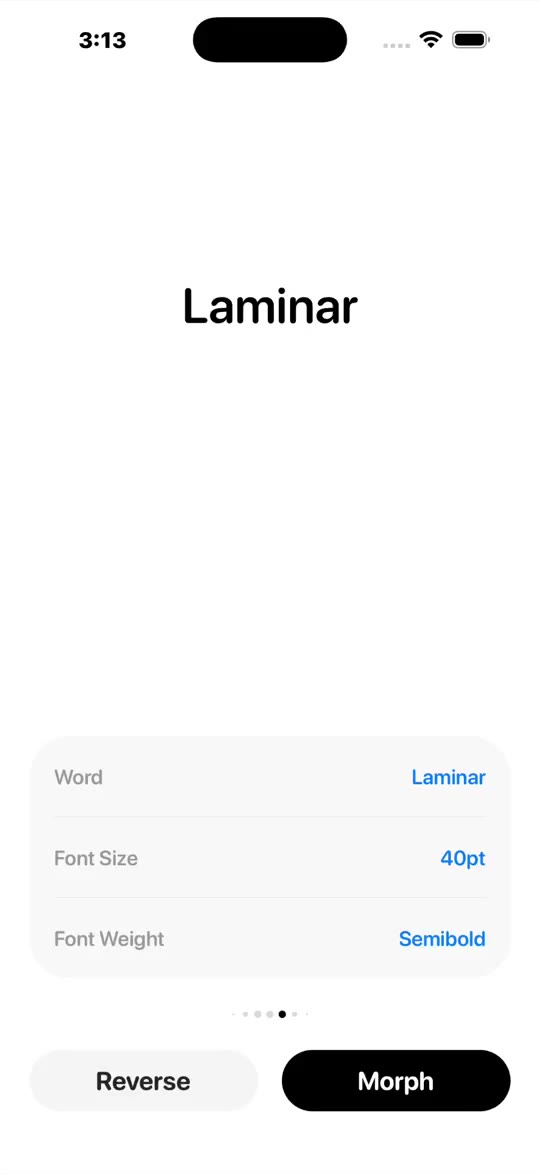
The public API is one prop.
<Laminar text="$1,234.56" />Behind that prop is a chain of decisions. Split the string into visible units. Decide which units survived from the previous value. Give surviving units stable keys. Animate entering and exiting units. Measure the next string. Animate the container width to match. Each decision exists because text has shape, identity, and layout, and each one needs to be solved correctly before the next one makes sense.
Text Is Displayed In Graphemes
The first problem is splitting. The obvious approach is to treat the string as an array and split by index. For basic Latin text that works fine. For anything else, it quietly breaks.
JavaScript strings are sequences of UTF-16 code units, not visible characters. An emoji like "👋" occupies two code units. An accented character like "é" can be stored as a single precomposed code point or as a base letter followed by a combining mark. Splitting by index cuts these apart, and the component ends up trying to animate half an emoji.
The correct unit for animation is a grapheme cluster, the thing a person perceives as a single character. Intl.Segmenter segments a string into exactly those units.
const graphemeSegmenter =
  typeof Intl !== "undefined" && typeof Intl.Segmenter === "function"
    ? new Intl.Segmenter(undefined, { granularity: "grapheme" })
    : null;

export const splitDisplayUnits = (input: string): string[] => {
  if (graphemeSegmenter) {
    return Array.from(
      graphemeSegmenter.segment(input),
      (part) => part.segment
    );
  }

  return Array.from(input);
};
The fallback uses Array.from, which handles surrogate pairs even though it misses some combining sequences. Most environments support Intl.Segmenter at this point, but the fallback is there for the ones that don't.
There is one more normalization worth doing. React Native text layout can measure plain spaces in ways that make animated widths drift slightly. Swapping them for non-breaking spaces keeps the measurement accurate.
export const normalizeDisplayUnit = (unit: string) =>
  unit === " " ? "\u00A0" : unit;
With that, the component has display units it can reason about. The next problem is what to do when they change.
Text Identity Uses LCS
A glyph that survives a value change should keep its key. A glyph that is new should receive a fresh one. This matters because React uses keys to decide whether to keep a node mounted or replace it, and Reanimated uses mount and unmount to trigger entering and exiting animations. Give a surviving glyph a new key and it animates out and back in for no reason. Give a new glyph a stale key and it never enters at all.
For text, the right way to find surviving glyphs is the Longest Common Subsequence algorithm. LCS finds the largest set of units, in order, that appears in both the previous string and the next string. Those matched units keep their keys, and the reconciler assigns fresh ones to everything else.
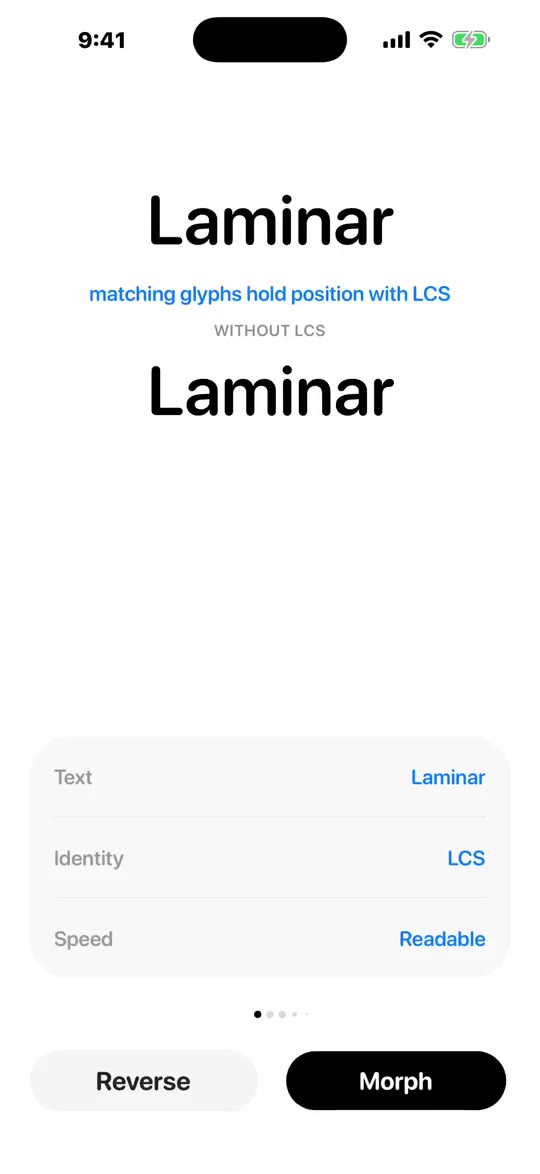
Without LCS every glyph exits and re-enters. With it, matching glyphs hold position
The algorithm has two phases. The first builds a table. The second backtracks through it to recover the matched pairs.
The table is a (previousLength + 1) × (nextLength + 1) grid of integers. Each cell dp[i][j] stores the length of the longest common subsequence of the first i units of the previous string and the first j units of the next string. The extra row and column of zeros act as a base case: an empty prefix matches nothing.
const previousLength = previousUnits.length;
const nextLength = nextUnits.length;

if (previousLength === 0 || nextLength === 0) {
  return [];
}

const dp = Array.from({ length: previousLength + 1 }, () =>
  new Array<number>(nextLength + 1).fill(0)
);
Filling the table is a nested loop. When the two units at position i and j match, the cell inherits the value from the diagonal, meaning the longest subsequence extended by one. When they differ, the cell takes the larger of the two neighbors above and to the left, meaning the best subsequence reachable without using the current unit from either string.
for (let previousIndex = 1; previousIndex <= previousLength; previousIndex += 1) {
  for (let nextIndex = 1; nextIndex <= nextLength; nextIndex += 1) {
    dp[previousIndex][nextIndex] =
      previousUnits[previousIndex - 1] === nextUnits[nextIndex - 1]
        ? dp[previousIndex - 1][nextIndex - 1] + 1
        : Math.max(
            dp[previousIndex - 1][nextIndex],
            dp[previousIndex][nextIndex - 1]
          );
  }
}
Once the table is full, the algorithm starts at the bottom-right corner and walks backward. Matching units at the current position get added to the result. Mismatches get resolved by stepping toward whichever neighbor holds the larger value, which traces the path that produced the longest subsequence.
const pairs: [number, number][] = [];
let previousIndex = previousLength;
let nextIndex = nextLength;

while (previousIndex > 0 && nextIndex > 0) {
  if (previousUnits[previousIndex - 1] === nextUnits[nextIndex - 1]) {
    pairs.push([previousIndex - 1, nextIndex - 1]);
    previousIndex -= 1;
    nextIndex -= 1;
    continue;
  }

  if (dp[previousIndex - 1][nextIndex] > dp[previousIndex][nextIndex - 1]) {
    previousIndex -= 1;
  } else {
    nextIndex -= 1;
  }
}

pairs.reverse();
return pairs;
The pairs come out in reverse order from the backtrack, so a final reverse() puts them back in string order before the reconciler assigns keys.
Running LCS on the full string every update would work, but the reconciler trims shared prefixes and suffixes first. If "hello" becomes "helloo", the first five characters are identical and there is nothing for LCS to solve. Stripping the obvious matches upfront keeps the algorithm fast and produces cleaner key assignments for the changed middle.
while (
  sharedPrefixLength < previousUnits.length &&
  sharedPrefixLength < nextUnits.length &&
  previousUnits[sharedPrefixLength] === nextUnits[sharedPrefixLength]
) {
  nextGlyphKeys[sharedPrefixLength] =
    previousKeys[sharedPrefixLength] ?? `${namespace}:c${nextSeed++}`;

  sharedPrefixLength += 1;
}
Each key is namespaced per component instance using useId, so two instances rendering the same string do not share keys and do not interfere with each other's animations.
Numbers Need Lanes
Numbers look like text but they follow different rules. When $1,234 changes to $12,345, the 4 stays in the ones column, the 3 stays in the tens column, and the 2 stays in the hundreds column. The number grew on the left side. Text-based LCS reads left to right and would match the wrong digits to the wrong lanes, producing animations that make no visual sense.
The numeric reconciler treats the value as a column-aligned structure instead. It splits the string into a lead section, the currency symbol or any prefix before the digits, and a tail section containing the digits, separators, and signs. The tail gets padded on the left so both the previous value and the next value share the same column positions from the right.
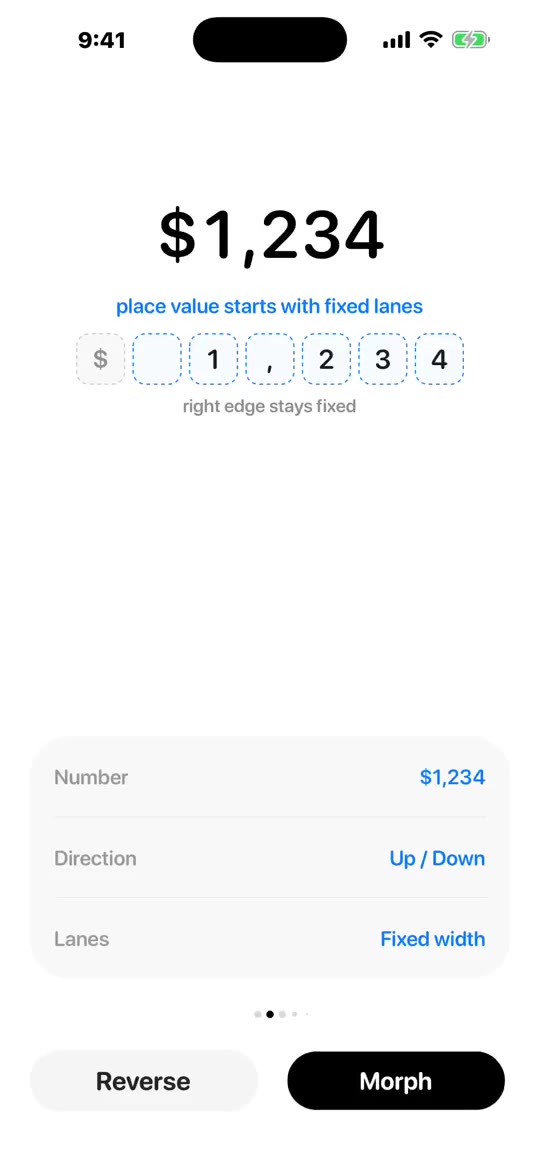
The ones column stays fixed. New digits enter from the left as the number grows
const leftPaddedPreviousUnits = [
  ...Array<string>(Math.max(0, laneCount - previousTailUnits.length)).fill(""),
  ...previousTailUnits,
];

const leftPaddedNextUnits = [
  ...Array<string>(Math.max(0, laneCount - nextTailUnits.length)).fill(""),
  ...nextTailUnits,
];
Once the columns line up, key assignment is straightforward. A lane keeps its key when the unit in that column stayed the same. A changed column gets a new key and animates in.
The reconciler also derives a travel direction by parsing the numeric magnitude of both values and comparing them.
const deriveFlowDirection = (
  previousValue: string,
  nextValue: string
): NumericFlowDirection =>
  Math.sign(
    readNumericMagnitude(nextValue) - readNumericMagnitude(previousValue)
  ) as NumericFlowDirection;
Increasing values slide their digits up. Decreasing values slide them down. The reader understands the direction of the change before reading a single digit, which is the whole point of animating numbers rather than swapping them.
The Animation Layer Has Two Jobs
React Native Reanimated gives each animated component three hooks: entering runs when it mounts, exiting runs when it unmounts, and layout runs when a mounted component shifts position or size. The component builds a motion recipe from each preset and threads it through every layer of the tree, so the same timing configuration drives glyph opacity, glyph translation, and container width all at once.
Enter and exit transitions run on the UI thread. The "worklet" directive tells the Metro bundler to serialize the function for that context. Inside a worklet, the function can read shared values and call Reanimated animation primitives, but it cannot touch JS-thread state.
export const createShiftTransition = ({
  delayMs = 0,
  durationMs,
  easing,
  fromOpacity,
  toOpacity,
  fromTranslateY,
  toTranslateY,
  fromScale,
  toScale,
}: TransitionParams): EntryExitAnimationFunction => {
  return () => {
    "worklet";

    const animate = (toValue: number) =>
      delayMs > 0
        ? withDelay(delayMs, withTiming(toValue, { duration: durationMs, easing }))
        : withTiming(toValue, { duration: durationMs, easing });

    return {
      initialValues: {
        opacity: fromOpacity,
        transform: [{ translateY: fromTranslateY }, { scale: fromScale }],
      },
      animations: {
        opacity: animate(toOpacity),
        transform: [
          { translateY: animate(toTranslateY) },
          { scale: animate(toScale) },
        ],
      },
    };
  };
};
Number lanes use one extra pattern that is worth understanding on its own. Each lane renders a hidden probe text node and an absolutely positioned animated token on top of it. The probe is invisible, but it holds the lane's width in the normal layout flow. The token is what the user sees animating in and out.
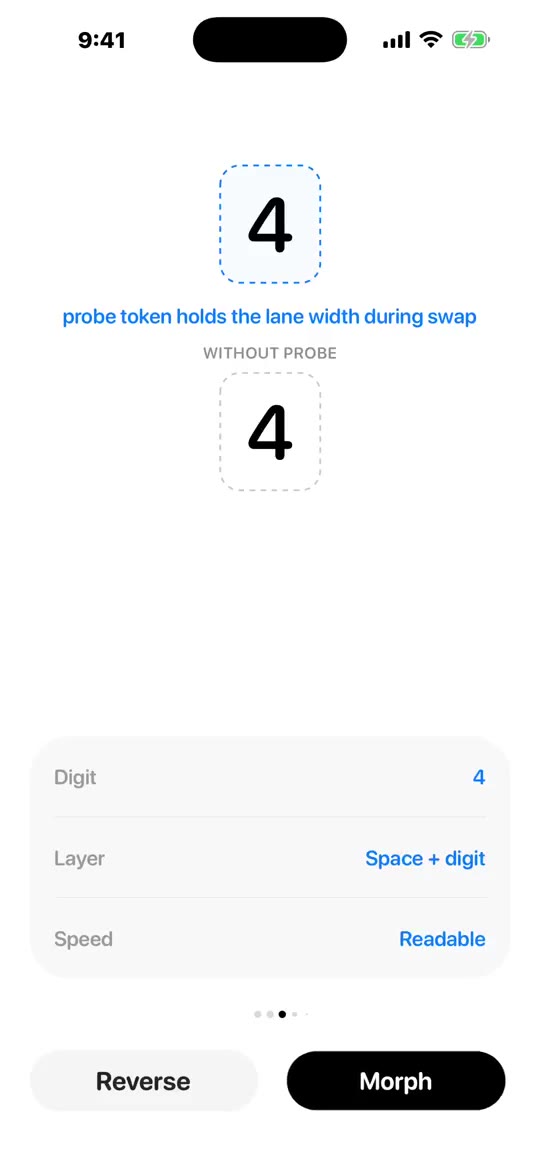
The invisible probe holds the lane width while the visible token animates in and out
<Animated.View layout={motionRecipe.layoutTransition} style={laneStyle}>
  <Text style={[textStyle, { opacity: 0 }]}>{unit}</Text>

  <Animated.Text
    key={`token:${tokenKey}`}
    entering={enterTransition}
    exiting={exitTransition}
    style={[textStyle, { position: "absolute", top: 0, left: 0 }]}
  >
    {unit}
  </Animated.Text>
</Animated.View>
The probe owns layout and the token owns motion. Without this split, the lane would collapse to zero width while the outgoing digit is still fading out, and the row would shift before the animation finishes. The probe keeps the space reserved for the full duration of the transition.
Motion Changes The Feel
The preset names and spring values were inspired by Calligraph, Raphael Salaja's morphing text library for the web. The library ships four presets: default, smooth, snappy, and bouncy. Each produces a different character without changing any of the identity or layout logic.
export const MOTION_PRESETS = {
  default: {
    duration: 0.38,
    ease: [0.19, 1, 0.22, 1],
  },
  smooth: {
    type: "spring",
    duration: 0.4,
    bounce: 0,
  },
  snappy: {
    type: "spring",
    duration: 0.35,
    bounce: 0.15,
  },
  bouncy: {
    type: "spring",
    duration: 0.5,
    bounce: 0.3,
  },
};
default uses a cubic bezier curve that covers most of the distance quickly and decelerates into place without any overshoot. It is a good fit for text that needs to feel clean and neutral. The spring presets model a damped harmonic oscillator. smooth is critically damped, meaning it reaches the target without overshooting at all. snappy adds a small overshoot that makes counters and prices feel responsive. bouncy pushes the overshoot further and works well for playful labels and button states.
One rule applies to all four presets: layout transitions always use timing, even when glyphs use a spring. A spring that overshoots its target width can push visible content outside the measured container bounds before snapping back. Timing keeps the container width reflow predictable, while the spring character lives in the individual glyphs.
Width Needs Measurement
Send Request and Sending Request do not occupy the same space. A container that snaps to the new width instantly undermines the glyph animation, because the frame jumps before the characters have moved. A container that stays at the old width clips the new string partway through the transition.
The component solves this by measuring the incoming string before it renders. A hidden text node with opacity: 0 renders the next value at the same font size and style as the live content. Its measured width drives a shared value through the same timing configuration as everything else, so the container follows the content at the same pace.
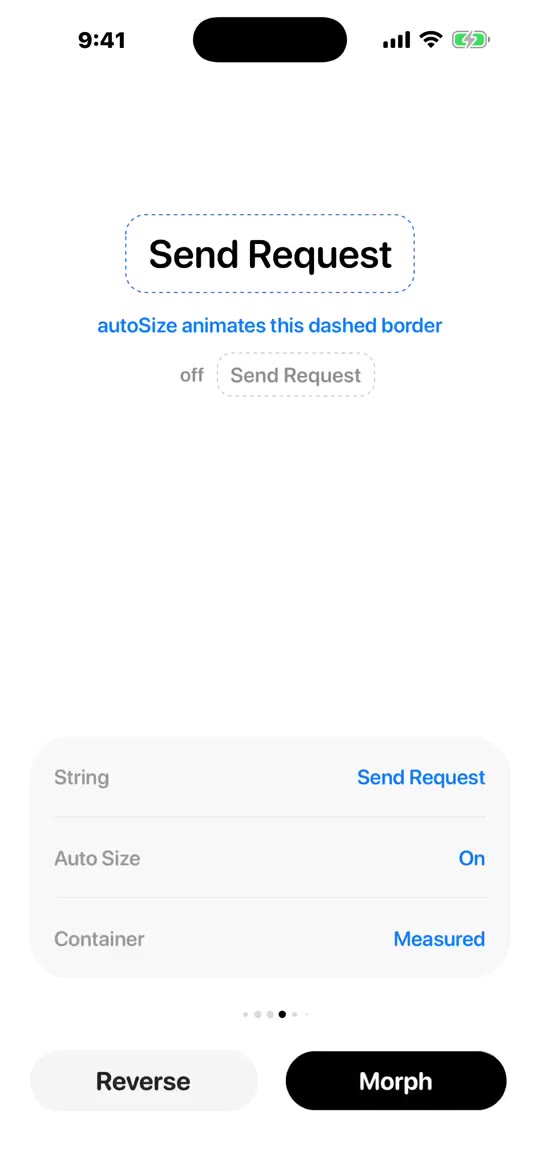
The container width follows the string on the same timing curve as the glyphs
export const useInlineAutoWidth = ({ enabled, driveToWidth }: Params) => {
  const widthValue = useSharedValue(0);
  const measuredWidthRef = useRef<number | null>(null);
  const bootstrappedRef = useRef(false);
  const [hasBootstrappedWidth, setHasBootstrappedWidth] = useState(false);

  const captureLayout = useCallback(
    (event: LayoutChangeEvent) => {
      if (!enabled) return;

      const nextWidth = Math.max(0, Math.ceil(event.nativeEvent.layout.width));

      if (measuredWidthRef.current === nextWidth) return;

      measuredWidthRef.current = nextWidth;

      if (!bootstrappedRef.current) {
        bootstrappedRef.current = true;
        widthValue.value = nextWidth;
        setHasBootstrappedWidth(true);
        return;
      }

      widthValue.value = driveToWidth(nextWidth);
    },
    [driveToWidth, enabled, widthValue]
  );

  const animatedWidthStyle = useAnimatedStyle(
    () =>
      enabled && hasBootstrappedWidth ? { width: widthValue.value } : {},
    [enabled, hasBootstrappedWidth]
  );

  return { captureLayout, animatedWidthStyle };
};
The first measurement snaps directly into place rather than animating from zero. This prevents the container from sliding in on the initial render when no change has occurred yet. Every measurement after that runs through driveToWidth, which comes from the active motion recipe and keeps the width animation synchronized with the glyph animation.
The hidden node needs to stay out of the accessibility tree so screen readers only encounter the live content, not its invisible twin.
accessibilityElementsHidden
importantForAccessibility="no-hide-descendants"
The API Stays Small
With all of that in place, the public API stays narrow because the component handles its own rules.
<Laminar text="$1,234.56" variant="number" fontSize={32} />
<Laminar text={label} animationPreset="snappy" />
<Laminar text={score} variant="number" animationPreset="bouncy" />
variant="text" uses LCS key reconciliation. variant="number" uses right-aligned lane reconciliation and directional digit travel. autoSize runs the measurement probe and animates the container width. clipToBounds controls whether glyphs can travel outside the viewport during transitions. animationPreset switches the motion character without touching any of the identity logic.
The root component wires the layers together and keeps each one from knowing about the others. The setup phase resolves the motion recipe, text style, and auto-width driver from the incoming props.
export const Laminar = React.memo(function Laminar({
  text,
  variant = "text",
  fontSize,
  color,
  className,
  style,
  containerClassName,
  containerStyle,
  fontStyle,
  animationDuration,
  animationPreset,
  stagger = 0.02,
  autoSize = true,
  clipToBounds = false,
}: Readonly<LaminarProps>) {
  const resolvedValue = String(text ?? "");

  const { motionRecipe, staggerMs } = useMorphMotion({
    variant,
    animationPreset,
    animationDuration,
    stagger,
  });

  const { textStyle } = useMorphTextStyle({
    fontSize,
    color,
    fontStyle,
    style,
  });

  const { captureLayout, animatedWidthStyle } = useInlineAutoWidth({
    enabled: autoSize,
    driveToWidth: motionRecipe.driveNumber,
  });
useMorphMotion picks the right preset, resolves any duration override, and returns the full recipe including the layout transition, enter and exit builders, and the number driver. useInlineAutoWidth receives motionRecipe.driveNumber directly so the container width animates on the same curve as the glyphs, without either hook knowing about the other.
The render phase passes the recipe down to the viewport and the appropriate run component.
  return (
    <MorphViewport
      autoSize={autoSize}
      clipToBounds={clipToBounds}
      containerClassName={containerClassName}
      containerStyle={containerStyle}
      animatedWidthStyle={animatedWidthStyle}
      measurement={
        <Text onLayout={captureLayout} className={className} style={textStyle}>
          {measuredValue}
        </Text>
      }
    >
      {variant === "number" ? (
        <NumberRun
          value={resolvedValue}
          motionRecipe={motionRecipe}
          fontSize={fontSize}
          className={className}
          textStyle={textStyle}
          staggerMs={staggerMs}
        />
      ) : (
        <TextRun
          value={resolvedValue}
          motionRecipe={motionRecipe}
          className={className}
          textStyle={textStyle}
        />
      )}
    </MorphViewport>
  );
});
MorphViewport renders the hidden measurement node and the animated width container. NumberRun and TextRun each receive the same motionRecipe so every part of the component moves together.
The stagger prop sequences glyph animations across the string. Each glyph's delay is its index multiplied by staggerMs. At the default of 0.02 seconds the stagger is barely perceptible, but enough to prevent the full string from changing in a single visual event. For numbers it creates a cascade across digit columns that reinforces the sense of place value shifting.
One last detail: both TextRun and NumberRun skip entering animations on the first paint. Each tracks whether its value has changed since mount using a ref. Before the first update, the entering prop is undefined, and Reanimated treats undefined as no animation. The component settles into its initial value without any motion, and only begins morphing after the first update.
Closing
The part I keep coming back to is that text changes carry meaning. A number going up feels different from a number going down. A label shifting from one state to another tells you something happened. Most interfaces throw that away in a single frame swap.
The component exists to keep it visible. That is the whole point of every decision in it, from the grapheme splitter to the probe to the motion recipe. The user should read the change, not just the result.